How to set up a Secure File Transfer Protocol
Week 6 with Altschool

I am a DevOps Engineer passionate about learning and writing about my experiences on my journey to be a world class Cloud/Devops Engineer. I am passionate about sharing knowledge, learning and mastering cloud technologies, making sweet treats, and putting smiles on the faces of people.
Week 6
This week was a slow week, more like, a lazy week. I don't know where the spirit of laziness came from but its stench was all over me. I hope to overcome it in week 7, because there's no room for laziness on this journey. Notwithstanding, I learnt the following this week.
I leant about Systemd. This was kind of a tricky topic to understand for me, I'm still not exactly sure how to navigate it, but i am thankful for Google and Youtube for further research. I also learnt about Security and CIS Benchmarks, Firewalls (Uncomplicated Firewall (ufw), and iptables. We were given a task at the end of the LMS session to play around the benchmark and see if we can implement at least 10 of them from the bulk.
Further into the week, I learnt how to install an sftp server; This is a Secure File Transfer Protocol service used in transferring files between clients and servers over the internet. sftpd has its own protocols
How to set up a Secure File Transfer Protocol
To do this, type the following commands on your terminal step by step:
apt install vsftpd this will install the service.
vsftp means Very Secure File Transfer Protocol
systemctl status vsftpd to confirm the status is active and running
systemctl enable --now vsftpd to enable it run on boot
you have to allow the service on ufw using the following commands to enable the following ports.
ufw allow 20/tcp
ufw allow 21/tcp
ufw allow 990/tcp
ufw allow 5000:10000/tcp this will allow ports from the range 5000-10000. we allowed this because we want to allow passive mode.
create a user "ftpuser" using adduser ftpuser command
Edit /etc/ssh/sshd file and deny ftpuser permission/access to ssh, meaning that the user cannot use ssh to communicate.
DenyUsers ftpuser: this is what i typed at the bottom of the file using vi, nano can be used too
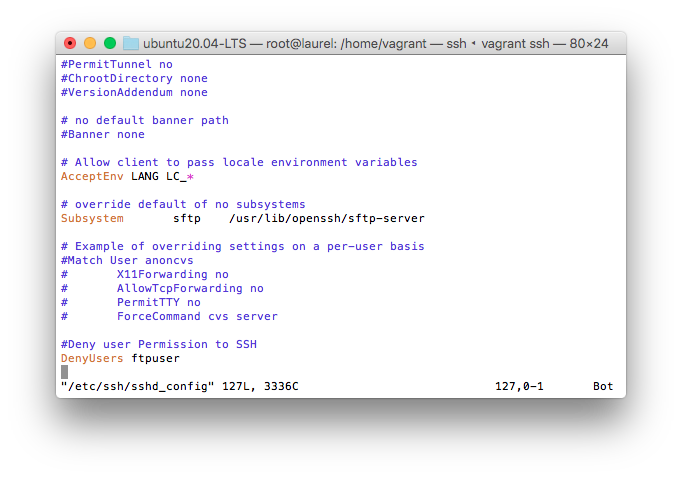
Restart the system using the command systemctl restart sshd
then create a directory ftp for the user mkdir ftp
Edit the configuration file nano /etc/vsftpd.conf and edit passive mode. This is just making the file production ready for sftp connection with a server. The connection will be done with port 21 but it will remain open on a passive mode.
Add this configuration in your file
`#Passive Mode for VSFTP communication with our server
pasv_min_port=5000
pasv-max-port=10000
#Location to store the files on sftp server local_root=/home/vagrant/ftp`
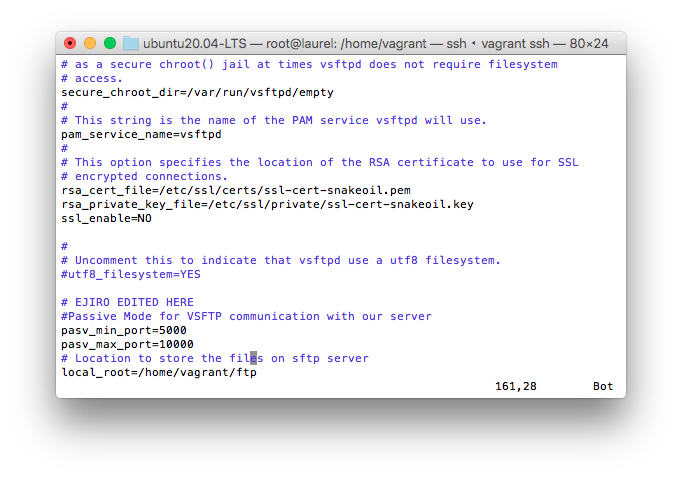
then restart system systemctl restart --now vsftpd
You can make a direct ftp connection to the server using fileZilla server, To do this
Change owner of the file with this command chown ftpuser ftp to enable the connection
then nano /etc/vsftpd.conf and include to your file
allow write_enable=YES
anon_mkdir_write_enabled
Then restart again with
systemctl restart --now vsftpd
I wasn't able to practice using fileZilla because for some reasons yet unknown , I can't seem to access filezilla page from my browser. However, if you followed the steps to this point, you have succeeded in installing vsftp, making a user, done some configuration to the file and given only that user access to the folder. If you didn't and you have any questions, please ask your questions in the comment section.
Thank you for reading

